Previous Versions
Here you can find the changelog of Weple Money: Expense Tracker since it was posted on our website on 2016-09-27 22:46:03.
The latest version is 6.1.6 and it was updated on 2026-10-14 12:46:38. See below the changes in each version.
Weple Money: Expense Tracker version 6.1.6
Updated At: 2026-10-14
Changes: Version History - Edit installment total — You can now edit the total installment amount directly from a transaction or change it back to a one-time payment.
- Remove transaction suggestions — Tap ⓧ under “Edit” to remove unwanted suggestions.
- External deposit — Add money received from outside the app without counting it as income, while still updating your account balance.
- Bug fixes — Fixed issues where attached photos could disappear after closing the app, some features remained locked despite an active subscription, and the wrong card could be selected from payment messages. We’ve also added a preview before restoring and an option to undo a restore.
We’re continuing to develop new features.
If you have any issues or suggestions, please send them through [Settings › Send Feedback].
Thank you. 6.1.6 6d ago - Backup and restore are now safer and more reliable.
- Added payment method filters — Cash, Debit Card, and Credit Card.
- You can now set installments directly from Quick Input.
- Fixed various other issues and inconveniences.
If you experience any issues or have feedback while using the app, please let us know via [Settings › Send Feedback].
We’ll continue to review your feedback and improve the app.
We’re also continuing to develop new features. 6.1.5 Sep 30 1. Faster loading
Fixed the calendar screen loading slowly for long-time users.
2. Record in foreign currencies (Pro)
You can now record spending abroad in the original currency. Tap the currency label next to the amount (e.g. "$▾") to choose a currency, and it's converted at that day's exchange rate.
Other bug fixes. 6.1.4 Sep 16 - Import from Money Manager — categories, subcategories and memos included
- Add entries from a CSV or Excel file — see them first, pick the rows you want, and undo the whole import at once
- Fixed various small bugs
You can switch back to the previous screens in General → Design → "Back to the classic look".
To report a problem or send us your thoughts, use General → "Bug Report". 6.1.3 Sep 12 - Budgets can now be browsed as cards, one per group.
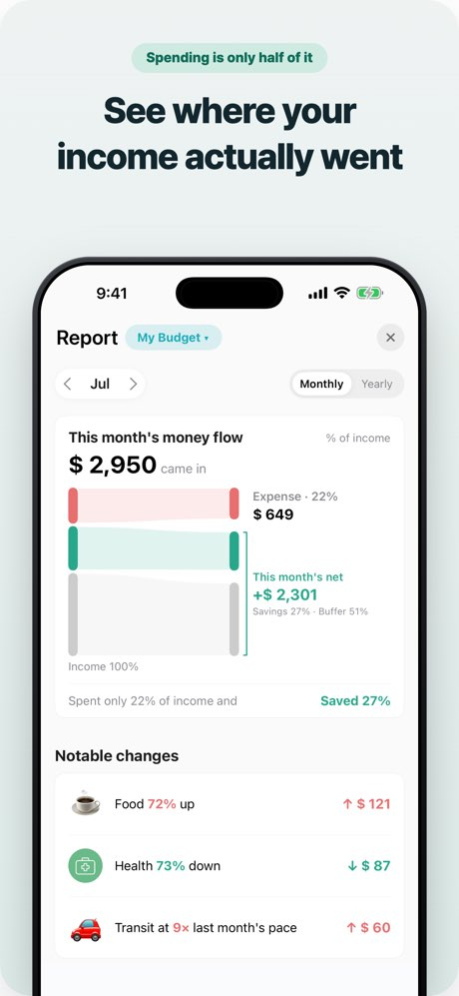
- The "Money flow" card in Report has been rebuilt.
- Quick entry can now pull in a bookmark.
- Savings receipts now have a Copy button too.
- Money that came back, like a card refund, can be entered as a negative amount.
- Other bug fixes.
To go back to the previous screens: [Settings › Design]
Bugs or feedback: [Settings › Send bugs or feedback] 6.1.2 Sep 10 - Screen editing — turn off cards you don't use on the Report and Budget screens.
- Various other bug fixes.
To go back to the previous layout: [Settings › Design]
To report a problem or send feedback: [Settings › Bug Report] 6.1.1 Sep 3 • Faster — much less waiting when moving between the calendar and reports.
• Subscriptions — recurring entries you mark as "Subscription" now gather in
one place, with the yearly total and the next charge date.
• Installments — see what you're still paying off and when each one ends, all
on one screen. You can also end one early.
• Fixed errors in savings/asset calculations and recurring settings.
• Quick entry now accepts an amount of 0.
To go back to the previous screens: [Settings > Design]
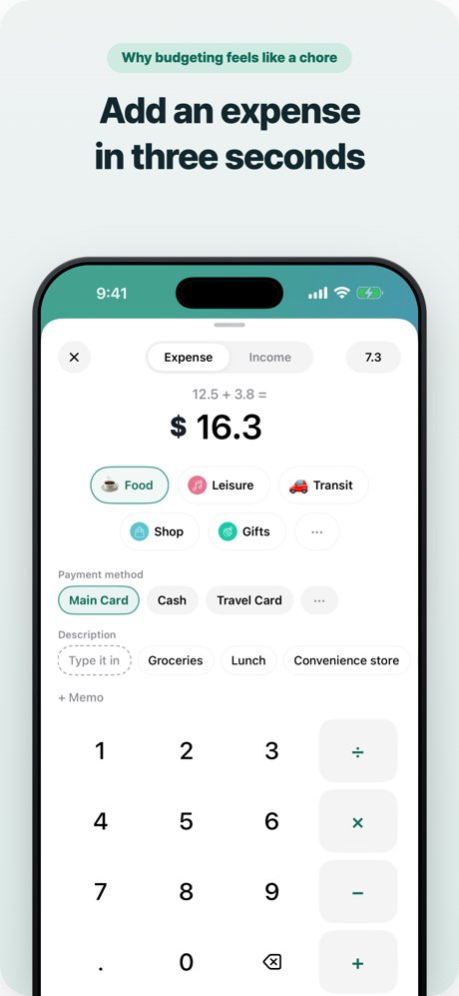
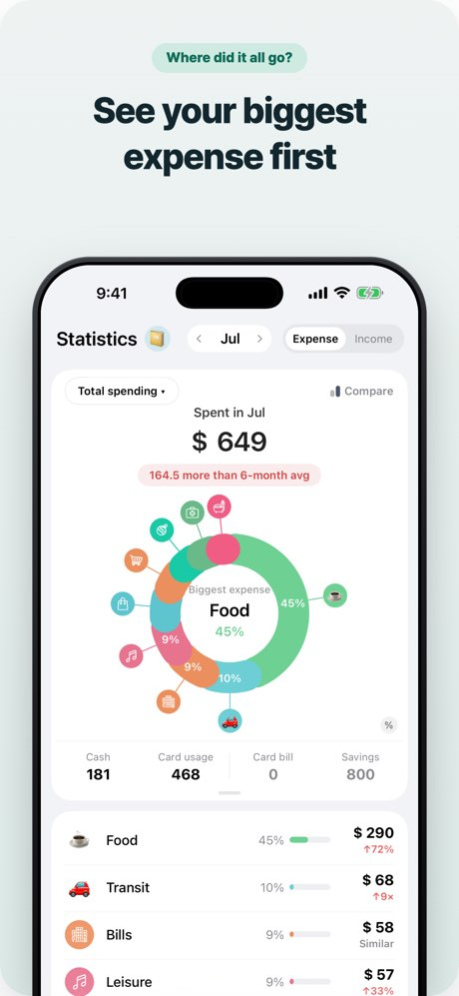
Found a bug, or have an idea? [Settings > Bug Report] 6.1.0 Sep 1 We rebuilt the quick entry screen and tidied up the tabs, Report, Budget, and Statistics.
[Prefer the previous screens?]
Nothing was removed — switch back any time, and switch again whenever you like.
· Entry screen: General > Design > Use the classic screen
[Tab changes]
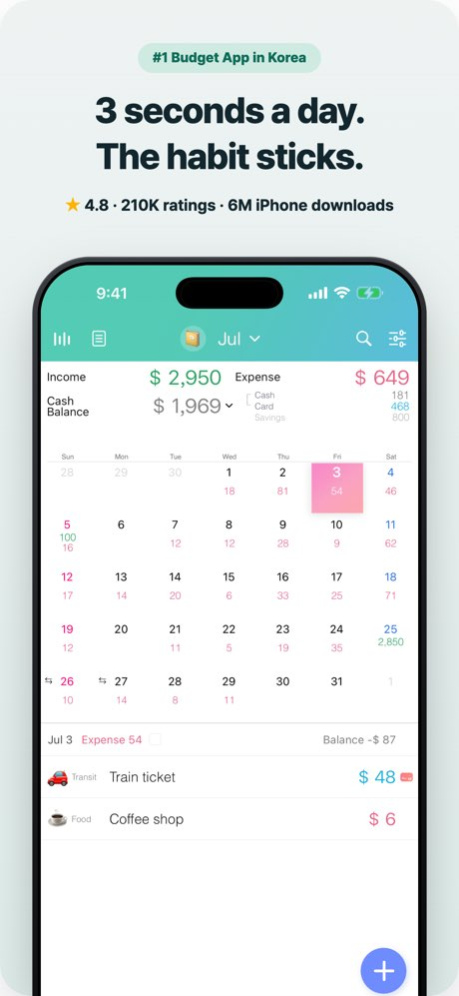
· Now Calendar · Budget · Statistics · Asset · General
· Report moved to the button at the top left of Calendar
[What's new]
· New quick entry screen — amount, category, and payment method on one screen
· Budget as a water bottle — remaining, weekly, and average modes
· Report condensed into a single page
· More asset types
· A dedicated receipt for transfers
We'd love to hear what you think. Thank you! 6.0.9 Aug 27 We rebuilt the quick entry screen and tidied up the tabs, Report, Budget, and Statistics.
[Prefer the previous screens?]
Nothing was removed — switch back any time, and switch again whenever you like.
· Entry screen: General > Design > Use the classic entry screen on the main screen
· Statistics & Budget: General > Design > Use classic Stats & Budget screens
· Tabs: General > Design > Edit Tab Bar > Layout presets > Classic layout
[Tab changes]
· Now Calendar · Budget · Statistics · Asset · General
· Report moved to the button at the top left of Calendar
[What's new]
· New quick entry screen — amount, category, and payment method on one screen
· Budget as a water bottle — remaining, weekly, and average modes
· Report condensed into a single page
· More asset types
· A dedicated receipt for transfers
We'd love to hear what you think. Thank you! 6.0.8 Aug 26 We rebuilt the quick entry screen and tidied up the tabs, Report, Budget, and Statistics.
[Prefer the previous screens?]
Nothing was removed — switch back any time, and switch again whenever you like.
· Entry screen: General > Design > Use the classic entry screen on the main screen
· Statistics & Budget: General > Design > Use classic Stats & Budget screens
· Tabs: General > Design > Edit Tab Bar > Layout presets > Classic layout
[Tab changes]
· Now Calendar · Budget · Statistics · Asset · General
· Report moved to the button at the top left of Calendar
[What's new]
· New quick entry screen — amount, category, and payment method on one screen
· Budget as a water bottle — remaining, weekly, and average modes
· Report condensed into a single page
· More asset types
· A dedicated receipt for transfers
We'd love to hear what you think. Thank you! 6.0.7 Aug 24 We rebuilt the quick entry screen and tidied up the tabs, Report, Budget, and Statistics.
[Prefer the previous screens?]
Nothing was removed — switch back any time, and switch again whenever you like.
· Entry screen: General > Design > Use the classic entry screen on the main screen
· Statistics & Budget: General > Design > Use classic Stats & Budget screens
· Tabs: General > Design > Edit Tab Bar > Layout presets > Classic layout
[Tab changes]
· Now Calendar · Budget · Statistics · Asset · General
· Report moved to the button at the top left of Calendar
[What's new]
· New quick entry screen — amount, category, and payment method on one screen
· Budget as a water bottle — remaining, weekly, and average modes
· Report condensed into a single page
· More asset types
· A dedicated receipt for transfers
We'd love to hear what you think. Thank you! 6.0.6 Aug 22 We rebuilt the quick entry screen and tidied up the tabs, Report, Budget, and Statistics.
[Prefer the previous screens?]
Nothing was removed — switch back any time, and switch again whenever you like.
· Entry screen: General > Design > Use the classic entry screen on the main screen
· Statistics & Budget: General > Design > Use classic Stats & Budget screens
· Tabs: General > Design > Edit Tab Bar > Layout presets > Classic layout
[Tab changes]
· Now Calendar · Budget · Statistics · Asset · General
· Report moved to the button at the top left of Calendar
[What's new]
· New quick entry screen — amount, category, and payment method on one screen
· Budget as a water bottle — remaining, weekly, and average modes
· Report condensed into a single page
· More asset types
· A dedicated receipt for transfers
We'd love to hear what you think. Thank you! 6.0.5 Aug 21 We have fixed several issues and further improved the usability of the app.
We will continue to make improvements to provide you with an even better experience. 5.2.0 Jun 15 We have fixed several issues and further improved the usability of the app.
We will continue to make improvements to provide you with an even better experience. 5.1.9 Jun 3 We have fixed several issues and further improved the usability of the app.
We will continue to make improvements to provide you with an even better experience. 5.1.8 May 29 We have fixed several issues and further improved the usability of the app.
We will continue to make improvements to provide you with an even better experience. 5.1.7 Apr 29 We have fixed several issues and further improved the usability of the app.
We will continue to make improvements to provide you with an even better experience. 5.1.6 Apr 17 We have fixed several issues and further improved the usability of the app.
We will continue to make improvements to provide you with an even better experience. 5.1.5 Feb 1 We have fixed several issues and further improved the usability of the app.
We will continue to make improvements to provide you with an even better experience. 5.1.4 Jan 18 We have fixed several issues and further improved the usability of the app.
We will continue to make improvements to provide you with an even better experience. 5.1.3 Jan 4 We have fixed several issues and further improved the usability of the app.
We will continue to make improvements to provide you with an even better experience. 5.1.2 Jan 2 We have fixed several issues and further improved the usability of the app.
We will continue to make improvements to provide you with an even better experience. 5.1.1 10/23/2025 We have fixed several issues and further improved the usability of the app.
We will continue to make improvements to provide you with an even better experience. 5.1.0 10/03/2025 - Supports iOS 26 and iPhone 17.
- Fixed various issues and improved overall usability. 5.0.9 09/19/2025 - Added a balance display option on the Home screen (This month’s cash balance / Account balance).
- Fixed various bugs and improved usability. 5.0.8 08/29/2025
Weple Money: Expense Tracker version 6.1.5
Updated At: 2026-10-06
Changes: Version History - Backup and restore are now safer and more reliable.
- Added payment method filters — Cash, Debit Card, and Credit Card.
- You can now set installments directly from Quick Input.
- Fixed various other issues and inconveniences.
If you experience any issues or have feedback while using the app, please let us know via [Settings › Send Feedback].
We’ll continue to review your feedback and improve the app.
We’re also continuing to develop new features. 6.1.5 5d ago 1. Faster loading
Fixed the calendar screen loading slowly for long-time users.
2. Record in foreign currencies (Pro)
You can now record spending abroad in the original currency. Tap the currency label next to the amount (e.g. "$▾") to choose a currency, and it's converted at that day's exchange rate.
Other bug fixes. 6.1.4 Sep 16 - Import from Money Manager — categories, subcategories and memos included
- Add entries from a CSV or Excel file — see them first, pick the rows you want, and undo the whole import at once
- Fixed various small bugs
You can switch back to the previous screens in General → Design → "Back to the classic look".
To report a problem or send us your thoughts, use General → "Bug Report". 6.1.3 Sep 12 - Budgets can now be browsed as cards, one per group.
- The "Money flow" card in Report has been rebuilt.
- Quick entry can now pull in a bookmark.
- Savings receipts now have a Copy button too.
- Money that came back, like a card refund, can be entered as a negative amount.
- Other bug fixes.
To go back to the previous screens: [Settings › Design]
Bugs or feedback: [Settings › Send bugs or feedback] 6.1.2 Sep 10 - Screen editing — turn off cards you don't use on the Report and Budget screens.
- Various other bug fixes.
To go back to the previous layout: [Settings › Design]
To report a problem or send feedback: [Settings › Bug Report] 6.1.1 Sep 3 • Faster — much less waiting when moving between the calendar and reports.
• Subscriptions — recurring entries you mark as "Subscription" now gather in
one place, with the yearly total and the next charge date.
• Installments — see what you're still paying off and when each one ends, all
on one screen. You can also end one early.
• Fixed errors in savings/asset calculations and recurring settings.
• Quick entry now accepts an amount of 0.
To go back to the previous screens: [Settings > Design]
Found a bug, or have an idea? [Settings > Bug Report] 6.1.0 Sep 1 We rebuilt the quick entry screen and tidied up the tabs, Report, Budget, and Statistics.
[Prefer the previous screens?]
Nothing was removed — switch back any time, and switch again whenever you like.
· Entry screen: General > Design > Use the classic screen
[Tab changes]
· Now Calendar · Budget · Statistics · Asset · General
· Report moved to the button at the top left of Calendar
[What's new]
· New quick entry screen — amount, category, and payment method on one screen
· Budget as a water bottle — remaining, weekly, and average modes
· Report condensed into a single page
· More asset types
· A dedicated receipt for transfers
We'd love to hear what you think. Thank you! 6.0.9 Aug 27 We rebuilt the quick entry screen and tidied up the tabs, Report, Budget, and Statistics.
[Prefer the previous screens?]
Nothing was removed — switch back any time, and switch again whenever you like.
· Entry screen: General > Design > Use the classic entry screen on the main screen
· Statistics & Budget: General > Design > Use classic Stats & Budget screens
· Tabs: General > Design > Edit Tab Bar > Layout presets > Classic layout
[Tab changes]
· Now Calendar · Budget · Statistics · Asset · General
· Report moved to the button at the top left of Calendar
[What's new]
· New quick entry screen — amount, category, and payment method on one screen
· Budget as a water bottle — remaining, weekly, and average modes
· Report condensed into a single page
· More asset types
· A dedicated receipt for transfers
We'd love to hear what you think. Thank you! 6.0.8 Aug 26 We rebuilt the quick entry screen and tidied up the tabs, Report, Budget, and Statistics.
[Prefer the previous screens?]
Nothing was removed — switch back any time, and switch again whenever you like.
· Entry screen: General > Design > Use the classic entry screen on the main screen
· Statistics & Budget: General > Design > Use classic Stats & Budget screens
· Tabs: General > Design > Edit Tab Bar > Layout presets > Classic layout
[Tab changes]
· Now Calendar · Budget · Statistics · Asset · General
· Report moved to the button at the top left of Calendar
[What's new]
· New quick entry screen — amount, category, and payment method on one screen
· Budget as a water bottle — remaining, weekly, and average modes
· Report condensed into a single page
· More asset types
· A dedicated receipt for transfers
We'd love to hear what you think. Thank you! 6.0.7 Aug 24 We rebuilt the quick entry screen and tidied up the tabs, Report, Budget, and Statistics.
[Prefer the previous screens?]
Nothing was removed — switch back any time, and switch again whenever you like.
· Entry screen: General > Design > Use the classic entry screen on the main screen
· Statistics & Budget: General > Design > Use classic Stats & Budget screens
· Tabs: General > Design > Edit Tab Bar > Layout presets > Classic layout
[Tab changes]
· Now Calendar · Budget · Statistics · Asset · General
· Report moved to the button at the top left of Calendar
[What's new]
· New quick entry screen — amount, category, and payment method on one screen
· Budget as a water bottle — remaining, weekly, and average modes
· Report condensed into a single page
· More asset types
· A dedicated receipt for transfers
We'd love to hear what you think. Thank you! 6.0.6 Aug 22 We rebuilt the quick entry screen and tidied up the tabs, Report, Budget, and Statistics.
[Prefer the previous screens?]
Nothing was removed — switch back any time, and switch again whenever you like.
· Entry screen: General > Design > Use the classic entry screen on the main screen
· Statistics & Budget: General > Design > Use classic Stats & Budget screens
· Tabs: General > Design > Edit Tab Bar > Layout presets > Classic layout
[Tab changes]
· Now Calendar · Budget · Statistics · Asset · General
· Report moved to the button at the top left of Calendar
[What's new]
· New quick entry screen — amount, category, and payment method on one screen
· Budget as a water bottle — remaining, weekly, and average modes
· Report condensed into a single page
· More asset types
· A dedicated receipt for transfers
We'd love to hear what you think. Thank you! 6.0.5 Aug 21 We have fixed several issues and further improved the usability of the app.
We will continue to make improvements to provide you with an even better experience. 5.2.0 Jun 15 We have fixed several issues and further improved the usability of the app.
We will continue to make improvements to provide you with an even better experience. 5.1.9 Jun 3 We have fixed several issues and further improved the usability of the app.
We will continue to make improvements to provide you with an even better experience. 5.1.8 May 29 We have fixed several issues and further improved the usability of the app.
We will continue to make improvements to provide you with an even better experience. 5.1.7 Apr 29 We have fixed several issues and further improved the usability of the app.
We will continue to make improvements to provide you with an even better experience. 5.1.6 Apr 17 We have fixed several issues and further improved the usability of the app.
We will continue to make improvements to provide you with an even better experience. 5.1.5 Feb 1 We have fixed several issues and further improved the usability of the app.
We will continue to make improvements to provide you with an even better experience. 5.1.4 Jan 18 We have fixed several issues and further improved the usability of the app.
We will continue to make improvements to provide you with an even better experience. 5.1.3 Jan 4 We have fixed several issues and further improved the usability of the app.
We will continue to make improvements to provide you with an even better experience. 5.1.2 Jan 2 We have fixed several issues and further improved the usability of the app.
We will continue to make improvements to provide you with an even better experience. 5.1.1 10/23/2025 We have fixed several issues and further improved the usability of the app.
We will continue to make improvements to provide you with an even better experience. 5.1.0 10/03/2025 - Supports iOS 26 and iPhone 17.
- Fixed various issues and improved overall usability. 5.0.9 09/19/2025 - Added a balance display option on the Home screen (This month’s cash balance / Account balance).
- Fixed various bugs and improved usability. 5.0.8 08/29/2025 - Overall performance improvements and bug fixes have been made. 5.0.7 07/25/2025
Weple Money: Expense Tracker version 6.1.5
Updated At: 2026-10-03
Changes: Version History - Backup and restore are now safer and more reliable.
- Added payment method filters — Cash, Debit Card, and Credit Card.
- You can now set installments directly from Quick Input.
- Fixed various other issues and inconveniences.
If you experience any issues or have feedback while using the app, please let us know via [Settings › Send Feedback].
We’ll continue to review your feedback and improve the app.
We’re also continuing to develop new features. 6.1.5 2d ago 1. Faster loading
Fixed the calendar screen loading slowly for long-time users.
2. Record in foreign currencies (Pro)
You can now record spending abroad in the original currency. Tap the currency label next to the amount (e.g. "$▾") to choose a currency, and it's converted at that day's exchange rate.
Other bug fixes. 6.1.4 Sep 16 - Import from Money Manager — categories, subcategories and memos included
- Add entries from a CSV or Excel file — see them first, pick the rows you want, and undo the whole import at once
- Fixed various small bugs
You can switch back to the previous screens in General → Design → "Back to the classic look".
To report a problem or send us your thoughts, use General → "Bug Report". 6.1.3 Sep 12 - Budgets can now be browsed as cards, one per group.
- The "Money flow" card in Report has been rebuilt.
- Quick entry can now pull in a bookmark.
- Savings receipts now have a Copy button too.
- Money that came back, like a card refund, can be entered as a negative amount.
- Other bug fixes.
To go back to the previous screens: [Settings › Design]
Bugs or feedback: [Settings › Send bugs or feedback] 6.1.2 Sep 10 - Screen editing — turn off cards you don't use on the Report and Budget screens.
- Various other bug fixes.
To go back to the previous layout: [Settings › Design]
To report a problem or send feedback: [Settings › Bug Report] 6.1.1 Sep 3 • Faster — much less waiting when moving between the calendar and reports.
• Subscriptions — recurring entries you mark as "Subscription" now gather in
one place, with the yearly total and the next charge date.
• Installments — see what you're still paying off and when each one ends, all
on one screen. You can also end one early.
• Fixed errors in savings/asset calculations and recurring settings.
• Quick entry now accepts an amount of 0.
To go back to the previous screens: [Settings > Design]
Found a bug, or have an idea? [Settings > Bug Report] 6.1.0 Sep 1 We rebuilt the quick entry screen and tidied up the tabs, Report, Budget, and Statistics.
[Prefer the previous screens?]
Nothing was removed — switch back any time, and switch again whenever you like.
· Entry screen: General > Design > Use the classic screen
[Tab changes]
· Now Calendar · Budget · Statistics · Asset · General
· Report moved to the button at the top left of Calendar
[What's new]
· New quick entry screen — amount, category, and payment method on one screen
· Budget as a water bottle — remaining, weekly, and average modes
· Report condensed into a single page
· More asset types
· A dedicated receipt for transfers
We'd love to hear what you think. Thank you! 6.0.9 Aug 27 We rebuilt the quick entry screen and tidied up the tabs, Report, Budget, and Statistics.
[Prefer the previous screens?]
Nothing was removed — switch back any time, and switch again whenever you like.
· Entry screen: General > Design > Use the classic entry screen on the main screen
· Statistics & Budget: General > Design > Use classic Stats & Budget screens
· Tabs: General > Design > Edit Tab Bar > Layout presets > Classic layout
[Tab changes]
· Now Calendar · Budget · Statistics · Asset · General
· Report moved to the button at the top left of Calendar
[What's new]
· New quick entry screen — amount, category, and payment method on one screen
· Budget as a water bottle — remaining, weekly, and average modes
· Report condensed into a single page
· More asset types
· A dedicated receipt for transfers
We'd love to hear what you think. Thank you! 6.0.8 Aug 26 We rebuilt the quick entry screen and tidied up the tabs, Report, Budget, and Statistics.
[Prefer the previous screens?]
Nothing was removed — switch back any time, and switch again whenever you like.
· Entry screen: General > Design > Use the classic entry screen on the main screen
· Statistics & Budget: General > Design > Use classic Stats & Budget screens
· Tabs: General > Design > Edit Tab Bar > Layout presets > Classic layout
[Tab changes]
· Now Calendar · Budget · Statistics · Asset · General
· Report moved to the button at the top left of Calendar
[What's new]
· New quick entry screen — amount, category, and payment method on one screen
· Budget as a water bottle — remaining, weekly, and average modes
· Report condensed into a single page
· More asset types
· A dedicated receipt for transfers
We'd love to hear what you think. Thank you! 6.0.7 Aug 24 We rebuilt the quick entry screen and tidied up the tabs, Report, Budget, and Statistics.
[Prefer the previous screens?]
Nothing was removed — switch back any time, and switch again whenever you like.
· Entry screen: General > Design > Use the classic entry screen on the main screen
· Statistics & Budget: General > Design > Use classic Stats & Budget screens
· Tabs: General > Design > Edit Tab Bar > Layout presets > Classic layout
[Tab changes]
· Now Calendar · Budget · Statistics · Asset · General
· Report moved to the button at the top left of Calendar
[What's new]
· New quick entry screen — amount, category, and payment method on one screen
· Budget as a water bottle — remaining, weekly, and average modes
· Report condensed into a single page
· More asset types
· A dedicated receipt for transfers
We'd love to hear what you think. Thank you! 6.0.6 Aug 22 We rebuilt the quick entry screen and tidied up the tabs, Report, Budget, and Statistics.
[Prefer the previous screens?]
Nothing was removed — switch back any time, and switch again whenever you like.
· Entry screen: General > Design > Use the classic entry screen on the main screen
· Statistics & Budget: General > Design > Use classic Stats & Budget screens
· Tabs: General > Design > Edit Tab Bar > Layout presets > Classic layout
[Tab changes]
· Now Calendar · Budget · Statistics · Asset · General
· Report moved to the button at the top left of Calendar
[What's new]
· New quick entry screen — amount, category, and payment method on one screen
· Budget as a water bottle — remaining, weekly, and average modes
· Report condensed into a single page
· More asset types
· A dedicated receipt for transfers
We'd love to hear what you think. Thank you! 6.0.5 Aug 21 We have fixed several issues and further improved the usability of the app.
We will continue to make improvements to provide you with an even better experience. 5.2.0 Jun 15 We have fixed several issues and further improved the usability of the app.
We will continue to make improvements to provide you with an even better experience. 5.1.9 Jun 3 We have fixed several issues and further improved the usability of the app.
We will continue to make improvements to provide you with an even better experience. 5.1.8 May 29 We have fixed several issues and further improved the usability of the app.
We will continue to make improvements to provide you with an even better experience. 5.1.7 Apr 29 We have fixed several issues and further improved the usability of the app.
We will continue to make improvements to provide you with an even better experience. 5.1.6 Apr 17 We have fixed several issues and further improved the usability of the app.
We will continue to make improvements to provide you with an even better experience. 5.1.5 Feb 1 We have fixed several issues and further improved the usability of the app.
We will continue to make improvements to provide you with an even better experience. 5.1.4 Jan 18 We have fixed several issues and further improved the usability of the app.
We will continue to make improvements to provide you with an even better experience. 5.1.3 Jan 4 We have fixed several issues and further improved the usability of the app.
We will continue to make improvements to provide you with an even better experience. 5.1.2 Jan 2 We have fixed several issues and further improved the usability of the app.
We will continue to make improvements to provide you with an even better experience. 5.1.1 10/23/2025 We have fixed several issues and further improved the usability of the app.
We will continue to make improvements to provide you with an even better experience. 5.1.0 10/03/2025 - Supports iOS 26 and iPhone 17.
- Fixed various issues and improved overall usability. 5.0.9 09/19/2025 - Added a balance display option on the Home screen (This month’s cash balance / Account balance).
- Fixed various bugs and improved usability. 5.0.8 08/29/2025 - Overall performance improvements and bug fixes have been made. 5.0.7 07/25/2025
Weple Money: Expense Tracker version 6.1.4
Updated At: 2026-09-26
Changes: Version History 1. Faster loading
Fixed the calendar screen loading slowly for long-time users.
2. Record in foreign currencies (Pro)
You can now record spending abroad in the original currency. Tap the currency label next to the amount (e.g. "$▾") to choose a currency, and it's converted at that day's exchange rate.
Other bug fixes. 6.1.4 Sep 16 - Import from Money Manager — categories, subcategories and memos included
- Add entries from a CSV or Excel file — see them first, pick the rows you want, and undo the whole import at once
- Fixed various small bugs
You can switch back to the previous screens in General → Design → "Back to the classic look".
To report a problem or send us your thoughts, use General → "Bug Report". 6.1.3 Sep 12 - Budgets can now be browsed as cards, one per group.
- The "Money flow" card in Report has been rebuilt.
- Quick entry can now pull in a bookmark.
- Savings receipts now have a Copy button too.
- Money that came back, like a card refund, can be entered as a negative amount.
- Other bug fixes.
To go back to the previous screens: [Settings › Design]
Bugs or feedback: [Settings › Send bugs or feedback] 6.1.2 Sep 10 - Screen editing — turn off cards you don't use on the Report and Budget screens.
- Various other bug fixes.
To go back to the previous layout: [Settings › Design]
To report a problem or send feedback: [Settings › Bug Report] 6.1.1 Sep 3 • Faster — much less waiting when moving between the calendar and reports.
• Subscriptions — recurring entries you mark as "Subscription" now gather in
one place, with the yearly total and the next charge date.
• Installments — see what you're still paying off and when each one ends, all
on one screen. You can also end one early.
• Fixed errors in savings/asset calculations and recurring settings.
• Quick entry now accepts an amount of 0.
To go back to the previous screens: [Settings > Design]
Found a bug, or have an idea? [Settings > Bug Report] 6.1.0 Sep 1 We rebuilt the quick entry screen and tidied up the tabs, Report, Budget, and Statistics.
[Prefer the previous screens?]
Nothing was removed — switch back any time, and switch again whenever you like.
· Entry screen: General > Design > Use the classic screen
[Tab changes]
· Now Calendar · Budget · Statistics · Asset · General
· Report moved to the button at the top left of Calendar
[What's new]
· New quick entry screen — amount, category, and payment method on one screen
· Budget as a water bottle — remaining, weekly, and average modes
· Report condensed into a single page
· More asset types
· A dedicated receipt for transfers
We'd love to hear what you think. Thank you! 6.0.9 Aug 27 We rebuilt the quick entry screen and tidied up the tabs, Report, Budget, and Statistics.
[Prefer the previous screens?]
Nothing was removed — switch back any time, and switch again whenever you like.
· Entry screen: General > Design > Use the classic entry screen on the main screen
· Statistics & Budget: General > Design > Use classic Stats & Budget screens
· Tabs: General > Design > Edit Tab Bar > Layout presets > Classic layout
[Tab changes]
· Now Calendar · Budget · Statistics · Asset · General
· Report moved to the button at the top left of Calendar
[What's new]
· New quick entry screen — amount, category, and payment method on one screen
· Budget as a water bottle — remaining, weekly, and average modes
· Report condensed into a single page
· More asset types
· A dedicated receipt for transfers
We'd love to hear what you think. Thank you! 6.0.8 Aug 26 We rebuilt the quick entry screen and tidied up the tabs, Report, Budget, and Statistics.
[Prefer the previous screens?]
Nothing was removed — switch back any time, and switch again whenever you like.
· Entry screen: General > Design > Use the classic entry screen on the main screen
· Statistics & Budget: General > Design > Use classic Stats & Budget screens
· Tabs: General > Design > Edit Tab Bar > Layout presets > Classic layout
[Tab changes]
· Now Calendar · Budget · Statistics · Asset · General
· Report moved to the button at the top left of Calendar
[What's new]
· New quick entry screen — amount, category, and payment method on one screen
· Budget as a water bottle — remaining, weekly, and average modes
· Report condensed into a single page
· More asset types
· A dedicated receipt for transfers
We'd love to hear what you think. Thank you! 6.0.7 Aug 24 We rebuilt the quick entry screen and tidied up the tabs, Report, Budget, and Statistics.
[Prefer the previous screens?]
Nothing was removed — switch back any time, and switch again whenever you like.
· Entry screen: General > Design > Use the classic entry screen on the main screen
· Statistics & Budget: General > Design > Use classic Stats & Budget screens
· Tabs: General > Design > Edit Tab Bar > Layout presets > Classic layout
[Tab changes]
· Now Calendar · Budget · Statistics · Asset · General
· Report moved to the button at the top left of Calendar
[What's new]
· New quick entry screen — amount, category, and payment method on one screen
· Budget as a water bottle — remaining, weekly, and average modes
· Report condensed into a single page
· More asset types
· A dedicated receipt for transfers
We'd love to hear what you think. Thank you! 6.0.6 Aug 22 We rebuilt the quick entry screen and tidied up the tabs, Report, Budget, and Statistics.
[Prefer the previous screens?]
Nothing was removed — switch back any time, and switch again whenever you like.
· Entry screen: General > Design > Use the classic entry screen on the main screen
· Statistics & Budget: General > Design > Use classic Stats & Budget screens
· Tabs: General > Design > Edit Tab Bar > Layout presets > Classic layout
[Tab changes]
· Now Calendar · Budget · Statistics · Asset · General
· Report moved to the button at the top left of Calendar
[What's new]
· New quick entry screen — amount, category, and payment method on one screen
· Budget as a water bottle — remaining, weekly, and average modes
· Report condensed into a single page
· More asset types
· A dedicated receipt for transfers
We'd love to hear what you think. Thank you! 6.0.5 Aug 21 We have fixed several issues and further improved the usability of the app.
We will continue to make improvements to provide you with an even better experience. 5.2.0 Jun 15 We have fixed several issues and further improved the usability of the app.
We will continue to make improvements to provide you with an even better experience. 5.1.9 Jun 3 We have fixed several issues and further improved the usability of the app.
We will continue to make improvements to provide you with an even better experience. 5.1.8 May 29 We have fixed several issues and further improved the usability of the app.
We will continue to make improvements to provide you with an even better experience. 5.1.7 Apr 29 We have fixed several issues and further improved the usability of the app.
We will continue to make improvements to provide you with an even better experience. 5.1.6 Apr 17 We have fixed several issues and further improved the usability of the app.
We will continue to make improvements to provide you with an even better experience. 5.1.5 Feb 1 We have fixed several issues and further improved the usability of the app.
We will continue to make improvements to provide you with an even better experience. 5.1.4 Jan 18 We have fixed several issues and further improved the usability of the app.
We will continue to make improvements to provide you with an even better experience. 5.1.3 Jan 4 We have fixed several issues and further improved the usability of the app.
We will continue to make improvements to provide you with an even better experience. 5.1.2 Jan 2 We have fixed several issues and further improved the usability of the app.
We will continue to make improvements to provide you with an even better experience. 5.1.1 10/23/2025 We have fixed several issues and further improved the usability of the app.
We will continue to make improvements to provide you with an even better experience. 5.1.0 10/03/2025 - Supports iOS 26 and iPhone 17.
- Fixed various issues and improved overall usability. 5.0.9 09/19/2025 - Added a balance display option on the Home screen (This month’s cash balance / Account balance).
- Fixed various bugs and improved usability. 5.0.8 08/29/2025 - Overall performance improvements and bug fixes have been made. 5.0.7 07/25/2025 - Negative amounts can now be entered. You can use this for card payment cancellations, etc.
- A “4-week interval” option has been added to recurring entries. 5.0.6 07/16/2025
Weple Money: Expense Tracker version 6.1.4
Updated At: 2026-09-19
Changes: Version History 1. Faster loading
Fixed the calendar screen loading slowly for long-time users.
2. Record in foreign currencies (Pro)
You can now record spending abroad in the original currency. Tap the currency label next to the amount (e.g. "$▾") to choose a currency, and it's converted at that day's exchange rate.
Other bug fixes. 6.1.4 2d ago - Import from Money Manager — categories, subcategories and memos included
- Add entries from a CSV or Excel file — see them first, pick the rows you want, and undo the whole import at once
- Fixed various small bugs
You can switch back to the previous screens in General → Design → "Back to the classic look".
To report a problem or send us your thoughts, use General → "Bug Report". 6.1.3 6d ago - Budgets can now be browsed as cards, one per group.
- The "Money flow" card in Report has been rebuilt.
- Quick entry can now pull in a bookmark.
- Savings receipts now have a Copy button too.
- Money that came back, like a card refund, can be entered as a negative amount.
- Other bug fixes.
To go back to the previous screens: [Settings › Design]
Bugs or feedback: [Settings › Send bugs or feedback] 6.1.2 Sep 10 - Screen editing — turn off cards you don't use on the Report and Budget screens.
- Various other bug fixes.
To go back to the previous layout: [Settings › Design]
To report a problem or send feedback: [Settings › Bug Report] 6.1.1 Sep 3 • Faster — much less waiting when moving between the calendar and reports.
• Subscriptions — recurring entries you mark as "Subscription" now gather in
one place, with the yearly total and the next charge date.
• Installments — see what you're still paying off and when each one ends, all
on one screen. You can also end one early.
• Fixed errors in savings/asset calculations and recurring settings.
• Quick entry now accepts an amount of 0.
To go back to the previous screens: [Settings > Design]
Found a bug, or have an idea? [Settings > Bug Report] 6.1.0 Sep 1 We rebuilt the quick entry screen and tidied up the tabs, Report, Budget, and Statistics.
[Prefer the previous screens?]
Nothing was removed — switch back any time, and switch again whenever you like.
· Entry screen: General > Design > Use the classic screen
[Tab changes]
· Now Calendar · Budget · Statistics · Asset · General
· Report moved to the button at the top left of Calendar
[What's new]
· New quick entry screen — amount, category, and payment method on one screen
· Budget as a water bottle — remaining, weekly, and average modes
· Report condensed into a single page
· More asset types
· A dedicated receipt for transfers
We'd love to hear what you think. Thank you! 6.0.9 Aug 27 We rebuilt the quick entry screen and tidied up the tabs, Report, Budget, and Statistics.
[Prefer the previous screens?]
Nothing was removed — switch back any time, and switch again whenever you like.
· Entry screen: General > Design > Use the classic entry screen on the main screen
· Statistics & Budget: General > Design > Use classic Stats & Budget screens
· Tabs: General > Design > Edit Tab Bar > Layout presets > Classic layout
[Tab changes]
· Now Calendar · Budget · Statistics · Asset · General
· Report moved to the button at the top left of Calendar
[What's new]
· New quick entry screen — amount, category, and payment method on one screen
· Budget as a water bottle — remaining, weekly, and average modes
· Report condensed into a single page
· More asset types
· A dedicated receipt for transfers
We'd love to hear what you think. Thank you! 6.0.8 Aug 26 We rebuilt the quick entry screen and tidied up the tabs, Report, Budget, and Statistics.
[Prefer the previous screens?]
Nothing was removed — switch back any time, and switch again whenever you like.
· Entry screen: General > Design > Use the classic entry screen on the main screen
· Statistics & Budget: General > Design > Use classic Stats & Budget screens
· Tabs: General > Design > Edit Tab Bar > Layout presets > Classic layout
[Tab changes]
· Now Calendar · Budget · Statistics · Asset · General
· Report moved to the button at the top left of Calendar
[What's new]
· New quick entry screen — amount, category, and payment method on one screen
· Budget as a water bottle — remaining, weekly, and average modes
· Report condensed into a single page
· More asset types
· A dedicated receipt for transfers
We'd love to hear what you think. Thank you! 6.0.7 Aug 24 We rebuilt the quick entry screen and tidied up the tabs, Report, Budget, and Statistics.
[Prefer the previous screens?]
Nothing was removed — switch back any time, and switch again whenever you like.
· Entry screen: General > Design > Use the classic entry screen on the main screen
· Statistics & Budget: General > Design > Use classic Stats & Budget screens
· Tabs: General > Design > Edit Tab Bar > Layout presets > Classic layout
[Tab changes]
· Now Calendar · Budget · Statistics · Asset · General
· Report moved to the button at the top left of Calendar
[What's new]
· New quick entry screen — amount, category, and payment method on one screen
· Budget as a water bottle — remaining, weekly, and average modes
· Report condensed into a single page
· More asset types
· A dedicated receipt for transfers
We'd love to hear what you think. Thank you! 6.0.6 Aug 22 We rebuilt the quick entry screen and tidied up the tabs, Report, Budget, and Statistics.
[Prefer the previous screens?]
Nothing was removed — switch back any time, and switch again whenever you like.
· Entry screen: General > Design > Use the classic entry screen on the main screen
· Statistics & Budget: General > Design > Use classic Stats & Budget screens
· Tabs: General > Design > Edit Tab Bar > Layout presets > Classic layout
[Tab changes]
· Now Calendar · Budget · Statistics · Asset · General
· Report moved to the button at the top left of Calendar
[What's new]
· New quick entry screen — amount, category, and payment method on one screen
· Budget as a water bottle — remaining, weekly, and average modes
· Report condensed into a single page
· More asset types
· A dedicated receipt for transfers
We'd love to hear what you think. Thank you! 6.0.5 Aug 21 We have fixed several issues and further improved the usability of the app.
We will continue to make improvements to provide you with an even better experience. 5.2.0 Jun 15 We have fixed several issues and further improved the usability of the app.
We will continue to make improvements to provide you with an even better experience. 5.1.9 Jun 3 We have fixed several issues and further improved the usability of the app.
We will continue to make improvements to provide you with an even better experience. 5.1.8 May 29 We have fixed several issues and further improved the usability of the app.
We will continue to make improvements to provide you with an even better experience. 5.1.7 Apr 29 We have fixed several issues and further improved the usability of the app.
We will continue to make improvements to provide you with an even better experience. 5.1.6 Apr 17 We have fixed several issues and further improved the usability of the app.
We will continue to make improvements to provide you with an even better experience. 5.1.5 Feb 1 We have fixed several issues and further improved the usability of the app.
We will continue to make improvements to provide you with an even better experience. 5.1.4 Jan 18 We have fixed several issues and further improved the usability of the app.
We will continue to make improvements to provide you with an even better experience. 5.1.3 Jan 4 We have fixed several issues and further improved the usability of the app.
We will continue to make improvements to provide you with an even better experience. 5.1.2 Jan 2 We have fixed several issues and further improved the usability of the app.
We will continue to make improvements to provide you with an even better experience. 5.1.1 10/23/2025 We have fixed several issues and further improved the usability of the app.
We will continue to make improvements to provide you with an even better experience. 5.1.0 10/03/2025 - Supports iOS 26 and iPhone 17.
- Fixed various issues and improved overall usability. 5.0.9 09/19/2025 - Added a balance display option on the Home screen (This month’s cash balance / Account balance).
- Fixed various bugs and improved usability. 5.0.8 08/29/2025 - Overall performance improvements and bug fixes have been made. 5.0.7 07/25/2025 - Negative amounts can now be entered. You can use this for card payment cancellations, etc.
- A “4-week interval” option has been added to recurring entries. 5.0.6 07/16/2025
Weple Money: Expense Tracker version 6.1.2
Updated At: 2026-09-12
Changes: Version History - Budgets can now be browsed as cards, one per group.
- The "Money flow" card in Report has been rebuilt.
- Quick entry can now pull in a bookmark.
- Savings receipts now have a Copy button too.
- Money that came back, like a card refund, can be entered as a negative amount.
- Other bug fixes.
To go back to the previous screens: [Settings › Design]
Bugs or feedback: [Settings › Send bugs or feedback] 6.1.2 1d ago - Screen editing — turn off cards you don't use on the Report and Budget screens.
- Various other bug fixes.
To go back to the previous layout: [Settings › Design]
To report a problem or send feedback: [Settings › Bug Report] 6.1.1 Sep 3 • Faster — much less waiting when moving between the calendar and reports.
• Subscriptions — recurring entries you mark as "Subscription" now gather in
one place, with the yearly total and the next charge date.
• Installments — see what you're still paying off and when each one ends, all
on one screen. You can also end one early.
• Fixed errors in savings/asset calculations and recurring settings.
• Quick entry now accepts an amount of 0.
To go back to the previous screens: [Settings > Design]
Found a bug, or have an idea? [Settings > Bug Report] 6.1.0 Sep 1 We rebuilt the quick entry screen and tidied up the tabs, Report, Budget, and Statistics.
[Prefer the previous screens?]
Nothing was removed — switch back any time, and switch again whenever you like.
· Entry screen: General > Design > Use the classic screen
[Tab changes]
· Now Calendar · Budget · Statistics · Asset · General
· Report moved to the button at the top left of Calendar
[What's new]
· New quick entry screen — amount, category, and payment method on one screen
· Budget as a water bottle — remaining, weekly, and average modes
· Report condensed into a single page
· More asset types
· A dedicated receipt for transfers
We'd love to hear what you think. Thank you! 6.0.9 Aug 27 We rebuilt the quick entry screen and tidied up the tabs, Report, Budget, and Statistics.
[Prefer the previous screens?]
Nothing was removed — switch back any time, and switch again whenever you like.
· Entry screen: General > Design > Use the classic entry screen on the main screen
· Statistics & Budget: General > Design > Use classic Stats & Budget screens
· Tabs: General > Design > Edit Tab Bar > Layout presets > Classic layout
[Tab changes]
· Now Calendar · Budget · Statistics · Asset · General
· Report moved to the button at the top left of Calendar
[What's new]
· New quick entry screen — amount, category, and payment method on one screen
· Budget as a water bottle — remaining, weekly, and average modes
· Report condensed into a single page
· More asset types
· A dedicated receipt for transfers
We'd love to hear what you think. Thank you! 6.0.8 Aug 26 We rebuilt the quick entry screen and tidied up the tabs, Report, Budget, and Statistics.
[Prefer the previous screens?]
Nothing was removed — switch back any time, and switch again whenever you like.
· Entry screen: General > Design > Use the classic entry screen on the main screen
· Statistics & Budget: General > Design > Use classic Stats & Budget screens
· Tabs: General > Design > Edit Tab Bar > Layout presets > Classic layout
[Tab changes]
· Now Calendar · Budget · Statistics · Asset · General
· Report moved to the button at the top left of Calendar
[What's new]
· New quick entry screen — amount, category, and payment method on one screen
· Budget as a water bottle — remaining, weekly, and average modes
· Report condensed into a single page
· More asset types
· A dedicated receipt for transfers
We'd love to hear what you think. Thank you! 6.0.7 Aug 24 We rebuilt the quick entry screen and tidied up the tabs, Report, Budget, and Statistics.
[Prefer the previous screens?]
Nothing was removed — switch back any time, and switch again whenever you like.
· Entry screen: General > Design > Use the classic entry screen on the main screen
· Statistics & Budget: General > Design > Use classic Stats & Budget screens
· Tabs: General > Design > Edit Tab Bar > Layout presets > Classic layout
[Tab changes]
· Now Calendar · Budget · Statistics · Asset · General
· Report moved to the button at the top left of Calendar
[What's new]
· New quick entry screen — amount, category, and payment method on one screen
· Budget as a water bottle — remaining, weekly, and average modes
· Report condensed into a single page
· More asset types
· A dedicated receipt for transfers
We'd love to hear what you think. Thank you! 6.0.6 Aug 22 We rebuilt the quick entry screen and tidied up the tabs, Report, Budget, and Statistics.
[Prefer the previous screens?]
Nothing was removed — switch back any time, and switch again whenever you like.
· Entry screen: General > Design > Use the classic entry screen on the main screen
· Statistics & Budget: General > Design > Use classic Stats & Budget screens
· Tabs: General > Design > Edit Tab Bar > Layout presets > Classic layout
[Tab changes]
· Now Calendar · Budget · Statistics · Asset · General
· Report moved to the button at the top left of Calendar
[What's new]
· New quick entry screen — amount, category, and payment method on one screen
· Budget as a water bottle — remaining, weekly, and average modes
· Report condensed into a single page
· More asset types
· A dedicated receipt for transfers
We'd love to hear what you think. Thank you! 6.0.5 Aug 21 We have fixed several issues and further improved the usability of the app.
We will continue to make improvements to provide you with an even better experience. 5.2.0 Jun 15 We have fixed several issues and further improved the usability of the app.
We will continue to make improvements to provide you with an even better experience. 5.1.9 Jun 3 We have fixed several issues and further improved the usability of the app.
We will continue to make improvements to provide you with an even better experience. 5.1.8 May 29 We have fixed several issues and further improved the usability of the app.
We will continue to make improvements to provide you with an even better experience. 5.1.7 Apr 29 We have fixed several issues and further improved the usability of the app.
We will continue to make improvements to provide you with an even better experience. 5.1.6 Apr 17 We have fixed several issues and further improved the usability of the app.
We will continue to make improvements to provide you with an even better experience. 5.1.5 Feb 1 We have fixed several issues and further improved the usability of the app.
We will continue to make improvements to provide you with an even better experience. 5.1.4 Jan 18 We have fixed several issues and further improved the usability of the app.
We will continue to make improvements to provide you with an even better experience. 5.1.3 Jan 4 We have fixed several issues and further improved the usability of the app.
We will continue to make improvements to provide you with an even better experience. 5.1.2 Jan 2 We have fixed several issues and further improved the usability of the app.
We will continue to make improvements to provide you with an even better experience. 5.1.1 10/23/2025 We have fixed several issues and further improved the usability of the app.
We will continue to make improvements to provide you with an even better experience. 5.1.0 10/03/2025 - Supports iOS 26 and iPhone 17.
- Fixed various issues and improved overall usability. 5.0.9 09/19/2025 - Added a balance display option on the Home screen (This month’s cash balance / Account balance).
- Fixed various bugs and improved usability. 5.0.8 08/29/2025 - Overall performance improvements and bug fixes have been made. 5.0.7 07/25/2025 - Negative amounts can now be entered. You can use this for card payment cancellations, etc.
- A “4-week interval” option has been added to recurring entries. 5.0.6 07/16/2025 Tab bar editing is now available!
Choose the tabs you want and rearrange them in any order.
Available in the Settings screen after watching an ad. 5.0.5 06/17/2025 - The backup process via email has become even simpler.
- Various bugs have been fixed, and the overall app experience has been improved. 5.0.2 04/20/2025
Weple Money: Expense Tracker version 6.1.1
Updated At: 2026-09-05
Changes: Version History - Screen editing — turn off cards you don't use on the Report and Budget screens.
- Various other bug fixes.
To go back to the previous layout: [Settings › Design]
To report a problem or send feedback: [Settings › Bug Report] 6.1.1 1d ago • Faster — much less waiting when moving between the calendar and reports.
• Subscriptions — recurring entries you mark as "Subscription" now gather in
one place, with the yearly total and the next charge date.
• Installments — see what you're still paying off and when each one ends, all
on one screen. You can also end one early.
• Fixed errors in savings/asset calculations and recurring settings.
• Quick entry now accepts an amount of 0.
To go back to the previous screens: [Settings > Design]
Found a bug, or have an idea? [Settings > Bug Report] 6.1.0 3d ago We rebuilt the quick entry screen and tidied up the tabs, Report, Budget, and Statistics.
[Prefer the previous screens?]
Nothing was removed — switch back any time, and switch again whenever you like.
· Entry screen: General > Design > Use the classic screen
[Tab changes]
· Now Calendar · Budget · Statistics · Asset · General
· Report moved to the button at the top left of Calendar
[What's new]
· New quick entry screen — amount, category, and payment method on one screen
· Budget as a water bottle — remaining, weekly, and average modes
· Report condensed into a single page
· More asset types
· A dedicated receipt for transfers
We'd love to hear what you think. Thank you! 6.0.9 Aug 27 We rebuilt the quick entry screen and tidied up the tabs, Report, Budget, and Statistics.
[Prefer the previous screens?]
Nothing was removed — switch back any time, and switch again whenever you like.
· Entry screen: General > Design > Use the classic entry screen on the main screen
· Statistics & Budget: General > Design > Use classic Stats & Budget screens
· Tabs: General > Design > Edit Tab Bar > Layout presets > Classic layout
[Tab changes]
· Now Calendar · Budget · Statistics · Asset · General
· Report moved to the button at the top left of Calendar
[What's new]
· New quick entry screen — amount, category, and payment method on one screen
· Budget as a water bottle — remaining, weekly, and average modes
· Report condensed into a single page
· More asset types
· A dedicated receipt for transfers
We'd love to hear what you think. Thank you! 6.0.8 Aug 26 We rebuilt the quick entry screen and tidied up the tabs, Report, Budget, and Statistics.
[Prefer the previous screens?]
Nothing was removed — switch back any time, and switch again whenever you like.
· Entry screen: General > Design > Use the classic entry screen on the main screen
· Statistics & Budget: General > Design > Use classic Stats & Budget screens
· Tabs: General > Design > Edit Tab Bar > Layout presets > Classic layout
[Tab changes]
· Now Calendar · Budget · Statistics · Asset · General
· Report moved to the button at the top left of Calendar
[What's new]
· New quick entry screen — amount, category, and payment method on one screen
· Budget as a water bottle — remaining, weekly, and average modes
· Report condensed into a single page
· More asset types
· A dedicated receipt for transfers
We'd love to hear what you think. Thank you! 6.0.7 Aug 24 We rebuilt the quick entry screen and tidied up the tabs, Report, Budget, and Statistics.
[Prefer the previous screens?]
Nothing was removed — switch back any time, and switch again whenever you like.
· Entry screen: General > Design > Use the classic entry screen on the main screen
· Statistics & Budget: General > Design > Use classic Stats & Budget screens
· Tabs: General > Design > Edit Tab Bar > Layout presets > Classic layout
[Tab changes]
· Now Calendar · Budget · Statistics · Asset · General
· Report moved to the button at the top left of Calendar
[What's new]
· New quick entry screen — amount, category, and payment method on one screen
· Budget as a water bottle — remaining, weekly, and average modes
· Report condensed into a single page
· More asset types
· A dedicated receipt for transfers
We'd love to hear what you think. Thank you! 6.0.6 Aug 22 We rebuilt the quick entry screen and tidied up the tabs, Report, Budget, and Statistics.
[Prefer the previous screens?]
Nothing was removed — switch back any time, and switch again whenever you like.
· Entry screen: General > Design > Use the classic entry screen on the main screen
· Statistics & Budget: General > Design > Use classic Stats & Budget screens
· Tabs: General > Design > Edit Tab Bar > Layout presets > Classic layout
[Tab changes]
· Now Calendar · Budget · Statistics · Asset · General
· Report moved to the button at the top left of Calendar
[What's new]
· New quick entry screen — amount, category, and payment method on one screen
· Budget as a water bottle — remaining, weekly, and average modes
· Report condensed into a single page
· More asset types
· A dedicated receipt for transfers
We'd love to hear what you think. Thank you! 6.0.5 Aug 21 We have fixed several issues and further improved the usability of the app.
We will continue to make improvements to provide you with an even better experience. 5.2.0 Jun 15 We have fixed several issues and further improved the usability of the app.
We will continue to make improvements to provide you with an even better experience. 5.1.9 Jun 3 We have fixed several issues and further improved the usability of the app.
We will continue to make improvements to provide you with an even better experience. 5.1.8 May 29 We have fixed several issues and further improved the usability of the app.
We will continue to make improvements to provide you with an even better experience. 5.1.7 Apr 29 We have fixed several issues and further improved the usability of the app.
We will continue to make improvements to provide you with an even better experience. 5.1.6 Apr 17 We have fixed several issues and further improved the usability of the app.
We will continue to make improvements to provide you with an even better experience. 5.1.5 Feb 1 We have fixed several issues and further improved the usability of the app.
We will continue to make improvements to provide you with an even better experience. 5.1.4 Jan 18 We have fixed several issues and further improved the usability of the app.
We will continue to make improvements to provide you with an even better experience. 5.1.3 Jan 4 We have fixed several issues and further improved the usability of the app.
We will continue to make improvements to provide you with an even better experience. 5.1.2 Jan 2 We have fixed several issues and further improved the usability of the app.
We will continue to make improvements to provide you with an even better experience. 5.1.1 10/23/2025 We have fixed several issues and further improved the usability of the app.
We will continue to make improvements to provide you with an even better experience. 5.1.0 10/03/2025 - Supports iOS 26 and iPhone 17.
- Fixed various issues and improved overall usability. 5.0.9 09/19/2025 - Added a balance display option on the Home screen (This month’s cash balance / Account balance).
- Fixed various bugs and improved usability. 5.0.8 08/29/2025 - Overall performance improvements and bug fixes have been made. 5.0.7 07/25/2025 - Negative amounts can now be entered. You can use this for card payment cancellations, etc.
- A “4-week interval” option has been added to recurring entries. 5.0.6 07/16/2025 Tab bar editing is now available!
Choose the tabs you want and rearrange them in any order.
Available in the Settings screen after watching an ad. 5.0.5 06/17/2025 - The backup process via email has become even simpler.
- Various bugs have been fixed, and the overall app experience has been improved. 5.0.2 04/20/2025 - We have resolved the termination error that was occurring on iOS 14. If the issue continues, please let us know at withweple@gmail.com.
- The recurring data management feature has been significantly improved. The Pro version now includes an option to pre-generate recurring data, making it even more convenient to use.
- We are continuously rolling out various convenience updates and will do our best to offer an even more user-friendly service through ongoing improvements. If you experience any inconvenience or have any suggestions for improvement, please feel free to let us know. 5.0.1 03/30/2025
Weple Money: Expense Tracker version 6.0.7
Updated At: 2026-08-24
Changes: Version History We rebuilt the quick entry screen and tidied up the tabs, Report, Budget, and Statistics.
[Prefer the previous screens?]
Nothing was removed — switch back any time, and switch again whenever you like.
· Entry screen: General > Design > Use the classic entry screen on the main screen
· Statistics & Budget: General > Design > Use classic Stats & Budget screens
· Tabs: General > Design > Edit Tab Bar > Layout presets > Classic layout
[Tab changes]
· Now Calendar · Budget · Statistics · Asset · General
· Report moved to the button at the top left of Calendar
[What's new]
· New quick entry screen — amount, category, and payment method on one screen
· Budget as a water bottle — remaining, weekly, and average modes
· Report condensed into a single page
· More asset types
· A dedicated receipt for transfers
We'd love to hear what you think. Thank you! 6.0.7 3h ago We rebuilt the quick entry screen and tidied up the tabs, Report, Budget, and Statistics.
[Prefer the previous screens?]
Nothing was removed — switch back any time, and switch again whenever you like.
· Entry screen: General > Design > Use the classic entry screen on the main screen
· Statistics & Budget: General > Design > Use classic Stats & Budget screens
· Tabs: General > Design > Edit Tab Bar > Layout presets > Classic layout
[Tab changes]
· Now Calendar · Budget · Statistics · Asset · General
· Report moved to the button at the top left of Calendar
[What's new]
· New quick entry screen — amount, category, and payment method on one screen
· Budget as a water bottle — remaining, weekly, and average modes
· Report condensed into a single page
· More asset types
· A dedicated receipt for transfers
We'd love to hear what you think. Thank you! 6.0.6 1d ago We rebuilt the quick entry screen and tidied up the tabs, Report, Budget, and Statistics.
[Prefer the previous screens?]
Nothing was removed — switch back any time, and switch again whenever you like.
· Entry screen: General > Design > Use the classic entry screen on the main screen
· Statistics & Budget: General > Design > Use classic Stats & Budget screens
· Tabs: General > Design > Edit Tab Bar > Layout presets > Classic layout
[Tab changes]
· Now Calendar · Budget · Statistics · Asset · General
· Report moved to the button at the top left of Calendar
[What's new]
· New quick entry screen — amount, category, and payment method on one screen
· Budget as a water bottle — remaining, weekly, and average modes
· Report condensed into a single page
· More asset types
· A dedicated receipt for transfers
We'd love to hear what you think. Thank you! 6.0.5 2d ago We have fixed several issues and further improved the usability of the app.
We will continue to make improvements to provide you with an even better experience. 5.2.0 Jun 15 We have fixed several issues and further improved the usability of the app.
We will continue to make improvements to provide you with an even better experience. 5.1.9 Jun 3 We have fixed several issues and further improved the usability of the app.
We will continue to make improvements to provide you with an even better experience. 5.1.8 May 29 We have fixed several issues and further improved the usability of the app.
We will continue to make improvements to provide you with an even better experience. 5.1.7 Apr 29 We have fixed several issues and further improved the usability of the app.
We will continue to make improvements to provide you with an even better experience. 5.1.6 Apr 17 We have fixed several issues and further improved the usability of the app.
We will continue to make improvements to provide you with an even better experience. 5.1.5 Feb 1 We have fixed several issues and further improved the usability of the app.
We will continue to make improvements to provide you with an even better experience. 5.1.4 Jan 18 We have fixed several issues and further improved the usability of the app.
We will continue to make improvements to provide you with an even better experience. 5.1.3 Jan 4 We have fixed several issues and further improved the usability of the app.
We will continue to make improvements to provide you with an even better experience. 5.1.2 Jan 2 We have fixed several issues and further improved the usability of the app.
We will continue to make improvements to provide you with an even better experience. 5.1.1 10/23/2025 We have fixed several issues and further improved the usability of the app.
We will continue to make improvements to provide you with an even better experience. 5.1.0 10/03/2025 - Supports iOS 26 and iPhone 17.
- Fixed various issues and improved overall usability. 5.0.9 09/19/2025 - Added a balance display option on the Home screen (This month’s cash balance / Account balance).
- Fixed various bugs and improved usability. 5.0.8 08/29/2025 - Overall performance improvements and bug fixes have been made. 5.0.7 07/25/2025 - Negative amounts can now be entered. You can use this for card payment cancellations, etc.
- A “4-week interval” option has been added to recurring entries. 5.0.6 07/16/2025 Tab bar editing is now available!
Choose the tabs you want and rearrange them in any order.
Available in the Settings screen after watching an ad. 5.0.5 06/17/2025 - The backup process via email has become even simpler.
- Various bugs have been fixed, and the overall app experience has been improved. 5.0.2 04/20/2025 - We have resolved the termination error that was occurring on iOS 14. If the issue continues, please let us know at withweple@gmail.com.
- The recurring data management feature has been significantly improved. The Pro version now includes an option to pre-generate recurring data, making it even more convenient to use.
- We are continuously rolling out various convenience updates and will do our best to offer an even more user-friendly service through ongoing improvements. If you experience any inconvenience or have any suggestions for improvement, please feel free to let us know. 5.0.1 03/30/2025 - The recurring data management feature has been significantly improved. The Pro version now includes an option to pre-generate recurring data, making it even more convenient to use.
- The screen error on the iPhone16e has been resolved.
- We are continuously rolling out various convenience updates and will do our best to offer an even more user-friendly service through ongoing improvements. If you experience any inconvenience or have any suggestions for improvement, please feel free to let us know. 5.0.0 03/20/2025 - The recurring data management feature has been significantly improved. The Pro version now includes an option to pre-generate recurring data, making it even more convenient to use.
- The screen error on the iPhone16e has been resolved, providing a more stable user experience.
- We are continuously rolling out various convenience updates and will do our best to offer an even more user-friendly service through ongoing improvements. If you experience any inconvenience or have any suggestions for improvement, please feel free to let us know. 4.9.7 03/18/2025 - We have fixed an issue where character encoding errors occurred in CSV files.
- We have resolved a problem that caused errors in card payment input when only one card or account was registered. We apologize for any inconvenience caused.
- Various usability updates are underway. We will continue to make gradual improvements to provide an even more convenient experience. Please feel free to let us know if you encounter any issues. 4.9.6 02/27/2025 - We have fixed the issue where an error occurred when entering card payment if only one card or account was registered. We apologize for any inconvenience caused.
- Various convenience updates are underway. We will continue to make gradual improvements to ensure a more user-friendly experience. Please let us know if you encounter any issues. 4.9.5 02/25/2025
Weple Money: Expense Tracker version 5.2.0
Updated At: 2026-08-05
Changes: Version History We have fixed several issues and further improved the usability of the app.
We will continue to make improvements to provide you with an even better experience. 5.2.0 Jun 15 We have fixed several issues and further improved the usability of the app.
We will continue to make improvements to provide you with an even better experience. 5.1.9 Jun 3 We have fixed several issues and further improved the usability of the app.
We will continue to make improvements to provide you with an even better experience. 5.1.8 May 29 We have fixed several issues and further improved the usability of the app.
We will continue to make improvements to provide you with an even better experience. 5.1.7 Apr 29 We have fixed several issues and further improved the usability of the app.
We will continue to make improvements to provide you with an even better experience. 5.1.6 Apr 17 We have fixed several issues and further improved the usability of the app.
We will continue to make improvements to provide you with an even better experience. 5.1.5 Feb 1 We have fixed several issues and further improved the usability of the app.
We will continue to make improvements to provide you with an even better experience. 5.1.4 Jan 18 We have fixed several issues and further improved the usability of the app.
We will continue to make improvements to provide you with an even better experience. 5.1.3 Jan 4 We have fixed several issues and further improved the usability of the app.
We will continue to make improvements to provide you with an even better experience. 5.1.2 Jan 2 We have fixed several issues and further improved the usability of the app.
We will continue to make improvements to provide you with an even better experience. 5.1.1 10/23/2025 We have fixed several issues and further improved the usability of the app.
We will continue to make improvements to provide you with an even better experience. 5.1.0 10/03/2025 - Supports iOS 26 and iPhone 17.
- Fixed various issues and improved overall usability. 5.0.9 09/19/2025 - Added a balance display option on the Home screen (This month’s cash balance / Account balance).
- Fixed various bugs and improved usability. 5.0.8 08/29/2025 - Overall performance improvements and bug fixes have been made. 5.0.7 07/25/2025 - Negative amounts can now be entered. You can use this for card payment cancellations, etc.
- A “4-week interval” option has been added to recurring entries. 5.0.6 07/16/2025 Tab bar editing is now available!
Choose the tabs you want and rearrange them in any order.
Available in the Settings screen after watching an ad. 5.0.5 06/17/2025 - The backup process via email has become even simpler.
- Various bugs have been fixed, and the overall app experience has been improved. 5.0.2 04/20/2025 - We have resolved the termination error that was occurring on iOS 14. If the issue continues, please let us know at withweple@gmail.com.
- The recurring data management feature has been significantly improved. The Pro version now includes an option to pre-generate recurring data, making it even more convenient to use.
- We are continuously rolling out various convenience updates and will do our best to offer an even more user-friendly service through ongoing improvements. If you experience any inconvenience or have any suggestions for improvement, please feel free to let us know. 5.0.1 03/30/2025 - The recurring data management feature has been significantly improved. The Pro version now includes an option to pre-generate recurring data, making it even more convenient to use.
- The screen error on the iPhone16e has been resolved.
- We are continuously rolling out various convenience updates and will do our best to offer an even more user-friendly service through ongoing improvements. If you experience any inconvenience or have any suggestions for improvement, please feel free to let us know. 5.0.0 03/20/2025 - The recurring data management feature has been significantly improved. The Pro version now includes an option to pre-generate recurring data, making it even more convenient to use.
- The screen error on the iPhone16e has been resolved, providing a more stable user experience.
- We are continuously rolling out various convenience updates and will do our best to offer an even more user-friendly service through ongoing improvements. If you experience any inconvenience or have any suggestions for improvement, please feel free to let us know. 4.9.7 03/18/2025 - We have fixed an issue where character encoding errors occurred in CSV files.
- We have resolved a problem that caused errors in card payment input when only one card or account was registered. We apologize for any inconvenience caused.
- Various usability updates are underway. We will continue to make gradual improvements to provide an even more convenient experience. Please feel free to let us know if you encounter any issues. 4.9.6 02/27/2025 - We have fixed the issue where an error occurred when entering card payment if only one card or account was registered. We apologize for any inconvenience caused.
- Various convenience updates are underway. We will continue to make gradual improvements to ensure a more user-friendly experience. Please let us know if you encounter any issues. 4.9.5 02/25/2025 - A feature has been added to deduct the card balance when entering card payments. You can select the card item in the Assets tab and proceed with the payment. The paid version offers an automatic withdrawal feature.
- An option has been added to automatically switch to Dark Mode according to system settings.
- Various other convenience updates are also in progress. We will apply them sequentially to enhance usability. 4.9.4 02/16/2025 - A feature has been added to deduct the card balance when entering card payments. You can select the card item in the Assets tab and proceed with the payment. The paid version offers an automatic withdrawal feature.
- An option has been added to automatically switch to Dark Mode according to system settings.
- Various other convenience updates are also in progress. We will apply them sequentially to enhance usability. 4.9.1 02/13/2025 - Removed the balance error for each transaction in the accounts.
- Fixed various other issues and improved app usability. 4.8.7 10/17/2024
Weple Money: Expense Tracker version 5.1.9
Updated At: 2026-06-11
Changes: Version History We have fixed several issues and further improved the usability of the app.
We will continue to make improvements to provide you with an even better experience. 5.1.9 Jun 3 We have fixed several issues and further improved the usability of the app.
We will continue to make improvements to provide you with an even better experience. 5.1.8 May 29 We have fixed several issues and further improved the usability of the app.
We will continue to make improvements to provide you with an even better experience. 5.1.7 Apr 29 We have fixed several issues and further improved the usability of the app.
We will continue to make improvements to provide you with an even better experience. 5.1.6 Apr 17 We have fixed several issues and further improved the usability of the app.
We will continue to make improvements to provide you with an even better experience. 5.1.5 Feb 1 We have fixed several issues and further improved the usability of the app.
We will continue to make improvements to provide you with an even better experience. 5.1.4 Jan 18 We have fixed several issues and further improved the usability of the app.
We will continue to make improvements to provide you with an even better experience. 5.1.3 Jan 4 We have fixed several issues and further improved the usability of the app.
We will continue to make improvements to provide you with an even better experience. 5.1.2 Jan 2 We have fixed several issues and further improved the usability of the app.
We will continue to make improvements to provide you with an even better experience. 5.1.1 10/23/2025 We have fixed several issues and further improved the usability of the app.
We will continue to make improvements to provide you with an even better experience. 5.1.0 10/03/2025 - Supports iOS 26 and iPhone 17.
- Fixed various issues and improved overall usability. 5.0.9 09/19/2025 - Added a balance display option on the Home screen (This month’s cash balance / Account balance).
- Fixed various bugs and improved usability. 5.0.8 08/29/2025 - Overall performance improvements and bug fixes have been made. 5.0.7 07/25/2025 - Negative amounts can now be entered. You can use this for card payment cancellations, etc.
- A “4-week interval” option has been added to recurring entries. 5.0.6 07/16/2025 Tab bar editing is now available!
Choose the tabs you want and rearrange them in any order.
Available in the Settings screen after watching an ad. 5.0.5 06/17/2025 - The backup process via email has become even simpler.
- Various bugs have been fixed, and the overall app experience has been improved. 5.0.2 04/20/2025 - We have resolved the termination error that was occurring on iOS 14. If the issue continues, please let us know at withweple@gmail.com.
- The recurring data management feature has been significantly improved. The Pro version now includes an option to pre-generate recurring data, making it even more convenient to use.
- We are continuously rolling out various convenience updates and will do our best to offer an even more user-friendly service through ongoing improvements. If you experience any inconvenience or have any suggestions for improvement, please feel free to let us know. 5.0.1 03/30/2025 - The recurring data management feature has been significantly improved. The Pro version now includes an option to pre-generate recurring data, making it even more convenient to use.
- The screen error on the iPhone16e has been resolved.
- We are continuously rolling out various convenience updates and will do our best to offer an even more user-friendly service through ongoing improvements. If you experience any inconvenience or have any suggestions for improvement, please feel free to let us know. 5.0.0 03/20/2025 - The recurring data management feature has been significantly improved. The Pro version now includes an option to pre-generate recurring data, making it even more convenient to use.
- The screen error on the iPhone16e has been resolved, providing a more stable user experience.
- We are continuously rolling out various convenience updates and will do our best to offer an even more user-friendly service through ongoing improvements. If you experience any inconvenience or have any suggestions for improvement, please feel free to let us know. 4.9.7 03/18/2025 - We have fixed an issue where character encoding errors occurred in CSV files.
- We have resolved a problem that caused errors in card payment input when only one card or account was registered. We apologize for any inconvenience caused.
- Various usability updates are underway. We will continue to make gradual improvements to provide an even more convenient experience. Please feel free to let us know if you encounter any issues. 4.9.6 02/27/2025 - We have fixed the issue where an error occurred when entering card payment if only one card or account was registered. We apologize for any inconvenience caused.
- Various convenience updates are underway. We will continue to make gradual improvements to ensure a more user-friendly experience. Please let us know if you encounter any issues. 4.9.5 02/25/2025 - A feature has been added to deduct the card balance when entering card payments. You can select the card item in the Assets tab and proceed with the payment. The paid version offers an automatic withdrawal feature.
- An option has been added to automatically switch to Dark Mode according to system settings.
- Various other convenience updates are also in progress. We will apply them sequentially to enhance usability. 4.9.4 02/16/2025 - A feature has been added to deduct the card balance when entering card payments. You can select the card item in the Assets tab and proceed with the payment. The paid version offers an automatic withdrawal feature.
- An option has been added to automatically switch to Dark Mode according to system settings.
- Various other convenience updates are also in progress. We will apply them sequentially to enhance usability. 4.9.1 02/13/2025 - Removed the balance error for each transaction in the accounts.
- Fixed various other issues and improved app usability. 4.8.7 10/17/2024 - Fixed the issue that occurred after entering the password.
- Resolved the error in the budget entry process.
- Additionally, improved the overall usability of the app. 4.8.6 09/26/2024